
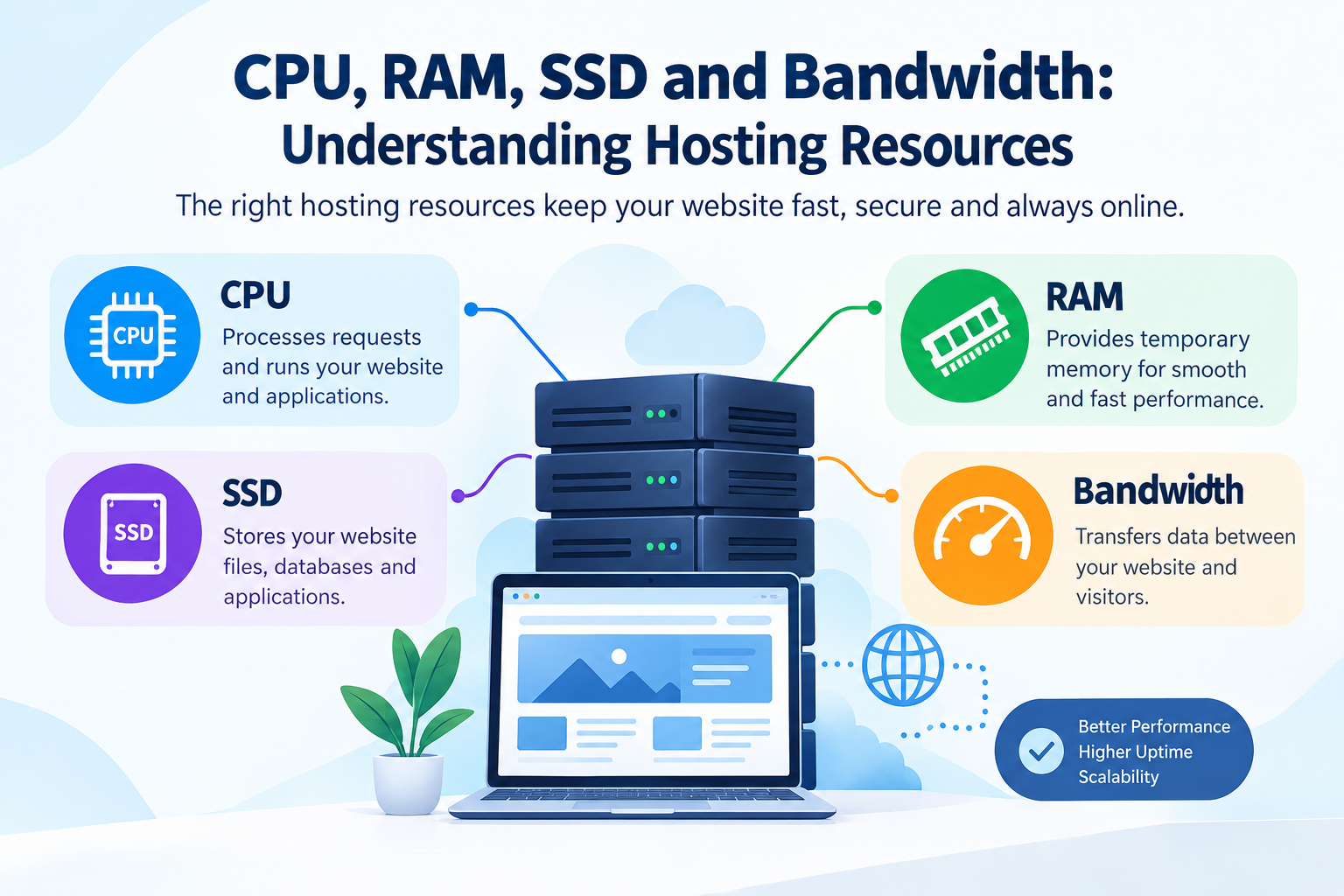
When choosing a web hosting plan, you may come across terms such as CPU, RAM, SSD storage, and bandwidth. These are more than just technical specifications—they directly affect how your website performs.
A website with limited hosting resources may load slowly, struggle during traffic spikes, or experience downtime. On the other hand, having the right amount of resources can help your website deliver a faster and smoother experience to visitors.
But how much CPU or RAM does your website actually need? What is the difference between SSD storage and bandwidth? And which hosting resources should you focus on when selecting a hosting plan?
In this guide, we will explain CPU, RAM, SSD, and bandwidth in web hosting in simple terms and show how each resource contributes to website performance.
Table of Contents
- What Are Hosting Resources?
- What Is CPU in Web Hosting?
- What Is RAM in Web Hosting?
- What Is SSD Storage?
- What Is Bandwidth in Web Hosting?
- CPU vs RAM vs SSD vs Bandwidth
- How Hosting Resources Affect Website Performance
- How Much Hosting Resources Does Your Website Need?
- Signs That Your Website Needs More Resources
- Tips for Choosing the Right Hosting Plan
- Frequently Asked Questions
- Conclusion
1. What Are Hosting Resources?
Hosting resources are the computing resources provided by a web hosting server to run your website and its applications.
The four important resources are:
- CPU: Processes website requests and tasks
- RAM: Provides temporary working memory
- SSD: Stores website files, databases, and applications
- Bandwidth: Handles the transfer of data between your website and visitors
Think of your hosting server like an office.
- CPU is the worker processing tasks.
- RAM is the desk space available for current work.
- SSD is the storage room where files are kept.
- Bandwidth is the road used to move information between the office and customers.
Each resource has a different purpose, but they work together to keep your website running efficiently.
2. What Is CPU in Web Hosting?
CPU (Central Processing Unit) is responsible for processing instructions and performing computing tasks on your hosting server.
Whenever a visitor opens a page, submits a form, runs a database query, or interacts with a web application, the server needs CPU resources to process those requests.
Why Is CPU Important for Hosting?
CPU resources become particularly important for websites that perform many server-side operations.
For example:
- E-commerce websites
- WordPress websites with multiple plugins
- CRM and ERP applications
- Dynamic websites
- Database-driven applications
- High-traffic websites
If your hosting plan provides insufficient CPU resources, your website may become slower when several processes run simultaneously.
CPU Cores and Hosting
Hosting providers may describe CPU resources using terms such as:
- 1 CPU core
- 2 CPU cores
- 4 CPU cores
- Dedicated CPU
- Shared CPU
Generally, more CPU resources allow a server to handle more processing tasks simultaneously, although actual performance also depends on the processor architecture and hosting environment.
3. What Is RAM in Web Hosting?
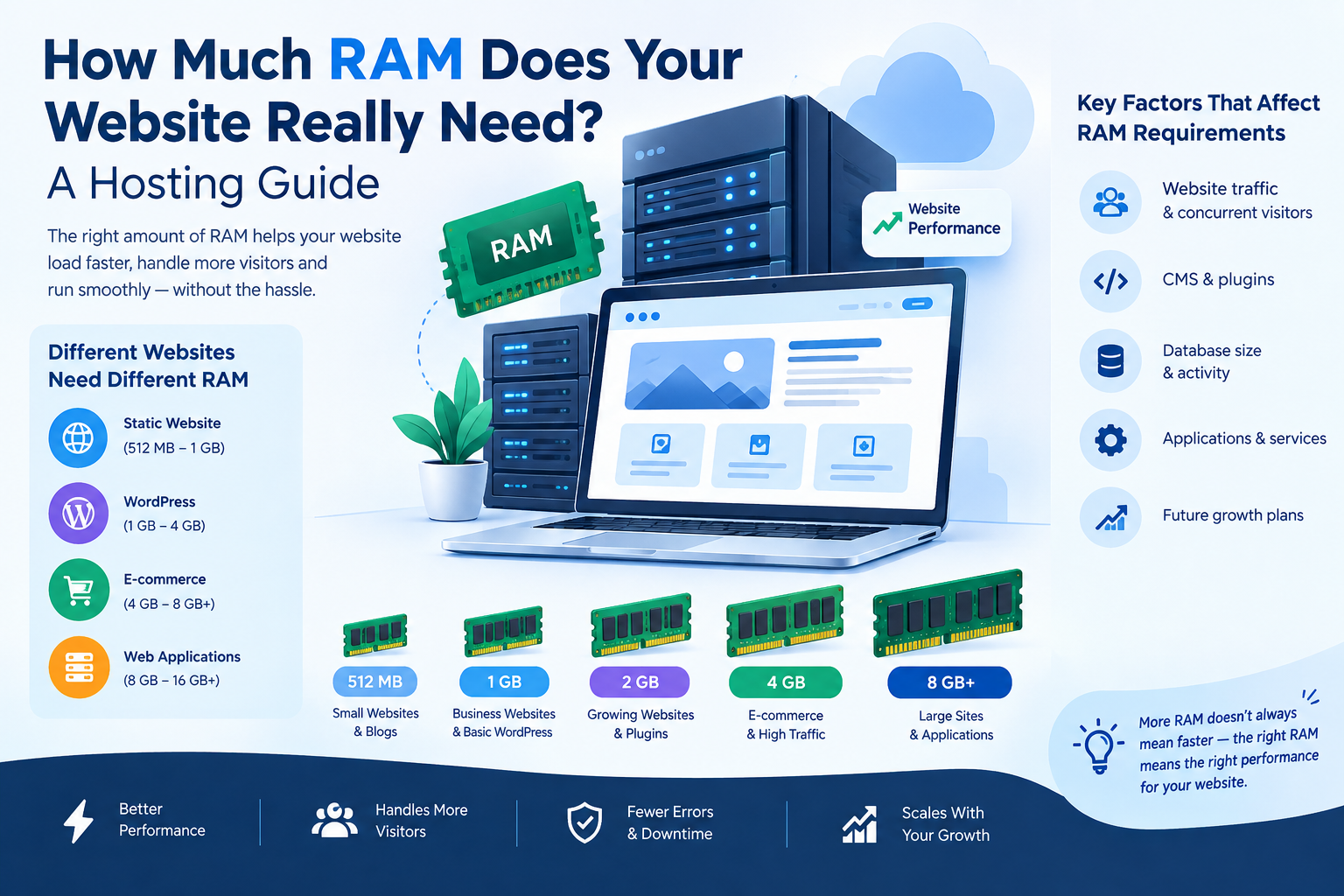
RAM (Random Access Memory) is temporary memory used by the server while running applications and processing requests.
Unlike storage, RAM is not primarily used for permanently storing website files. Instead, it helps the server quickly access the information and processes it currently needs.
Why Is RAM Important?
More available RAM can help websites handle multiple processes simultaneously.
RAM can be used by:
- Website applications
- Databases
- PHP processes
- CMS platforms
- Caching systems
- Server software
For example, a small static website may require relatively few resources, while a large WordPress website with several plugins and database operations may require significantly more memory.
What Happens When RAM Is Insufficient?
When available memory becomes limited, the server may struggle to process requests efficiently.
You may notice:
- Slow website response
- Application errors
- Failed processes
- Increased server load
- Poor performance during traffic spikes
This is why RAM is an important factor when selecting hosting for resource-intensive websites.
4. What Is SSD Storage?
SSD stands for Solid-State Drive. SSD storage is used to store your website's files, databases, applications, images, emails, and other data.
Traditional HDD storage uses mechanical components, while SSDs use flash memory and have no moving parts.
Why Is SSD Hosting Important?
SSD storage can provide faster data access than traditional HDD storage.
This can benefit:
- Website loading
- Database operations
- File access
- Application performance
- Server responsiveness
For websites where speed matters, SSD-based hosting can be an important consideration.
What Is NVMe SSD Hosting?
NVMe (Non-Volatile Memory Express) is a storage protocol designed for high-speed solid-state storage.
NVMe SSD storage can offer faster data transfer and lower latency than traditional storage technologies, depending on the server configuration and workload.
However, storage technology is only one part of website speed. Website optimization, caching, code quality, database performance, and network performance also matter.
5. What Is Bandwidth in Web Hosting?
Bandwidth refers to the amount of data that can be transferred between your website's server and visitors over a given period.
For example, when someone visits your website, the server sends website files such as:
- HTML
- CSS
- JavaScript
- Images
- Videos
- Documents
All of this data contributes to bandwidth usage.
Simple Bandwidth Example
Suppose your website page is approximately 2 MB in size.
If 10,000 visitors each load that page once:
2 MB × 10,000 = 20,000 MB
That is approximately 20 GB of data transfer.
Actual bandwidth usage can be higher or lower depending on page size, repeat visits, caching, downloads, media files, and other factors.
Why Is Bandwidth Important?
Websites with large amounts of traffic or large media files can consume more bandwidth.
Bandwidth becomes particularly important for:
- High-traffic websites
- Online stores
- Video websites
- Image-heavy websites
- Download platforms
- Websites running advertising campaigns
6. CPU vs RAM vs SSD vs Bandwidth
Understanding the difference between these resources makes it easier to choose the right hosting plan.
| Hosting Resource | Main Purpose | Can Affect |
|---|---|---|
| CPU | Processes computing tasks | Server processing and application performance |
| RAM | Temporary working memory | Concurrent processes and application performance |
| SSD | Stores website data | File and database access speed |
| Bandwidth | Transfers data | Traffic capacity and data delivery |
These resources should not be considered independently.
For example, upgrading your SSD alone may not solve a website that is suffering from insufficient RAM or CPU resources.
7. How Hosting Resources Affect Website Performance
Your website's performance depends on several factors, and hosting resources are an important part of the overall system.
1. Website Traffic
More visitors generally mean more requests that your server needs to handle.
2. Website Type
A static business website usually requires fewer resources than an e-commerce store or web application.
3. Website Size
Large images, videos, downloadable files, and databases can increase resource requirements.
4. Plugins and Applications
CMS platforms such as WordPress can use additional CPU and RAM depending on the number and complexity of plugins, themes, and processes.
5. Database Usage
Websites that frequently read and write database information may require more processing and memory resources.
6. Optimization
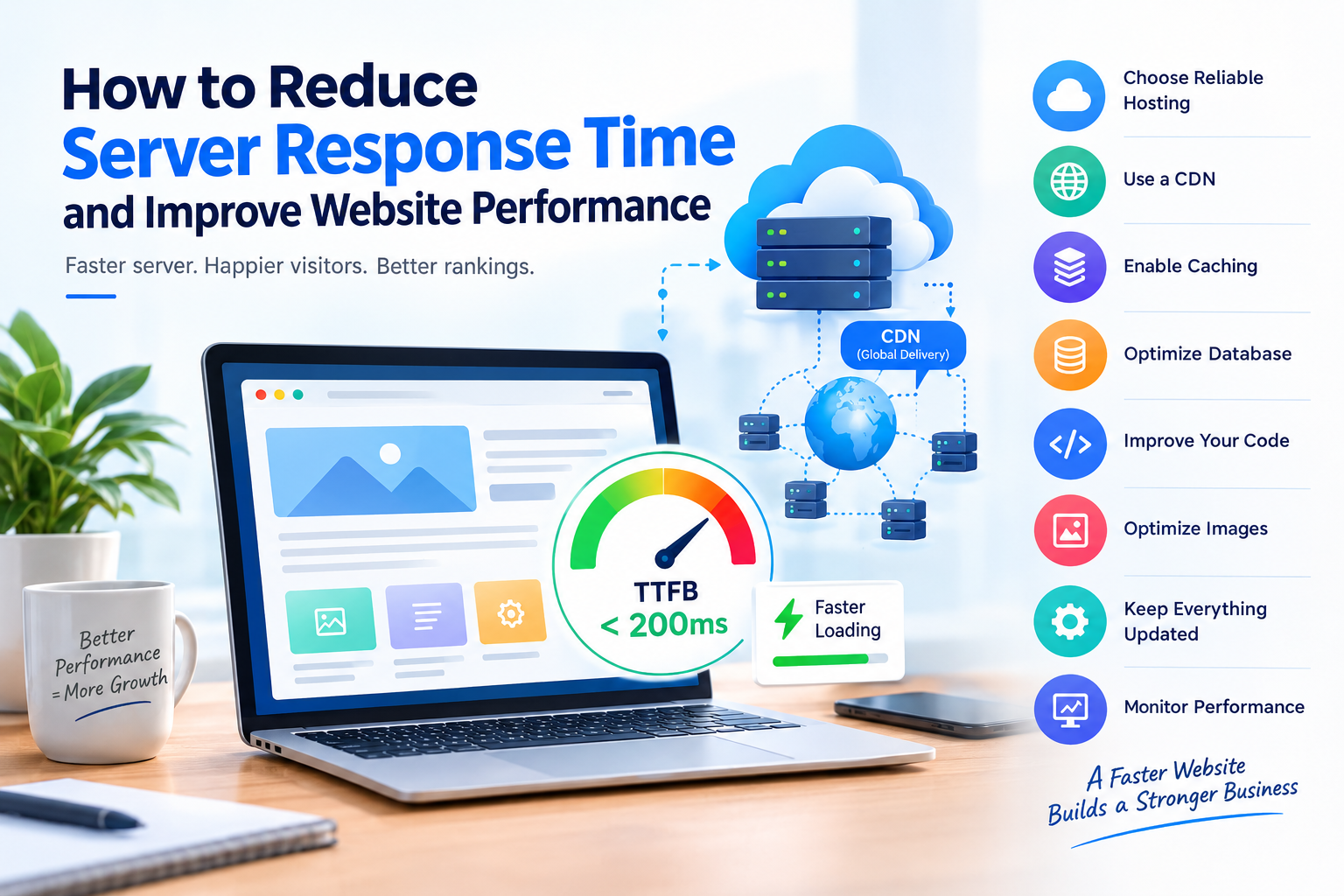
Caching, image compression, optimized code, database optimization, and a CDN can reduce the workload on the hosting server.
8. How Much Hosting Resources Does Your Website Need?
There is no single resource requirement that works for every website.
Your needs depend on your website's:
- Monthly visitors
- Number of pages
- Website platform
- Database size
- Plugins and applications
- Media files
- Traffic patterns
- Business requirements
Small Business Website
A simple company website with a few pages and moderate traffic may work well with a basic hosting plan.
WordPress Website
A WordPress website with several plugins, regular content updates, and moderate traffic may require more CPU and RAM.
E-commerce Website
An online store generally needs more resources because it may handle product databases, customer accounts, shopping carts, orders, payments, and other dynamic processes.
High-Traffic Website
Websites receiving large or unpredictable amounts of traffic may benefit from scalable hosting, VPS, cloud hosting, or dedicated resources.
9. Signs That Your Website Needs More Resources
How do you know when it is time to upgrade your hosting?
Look for signs such as:
Slow Server Response
Your website may take longer to respond even after basic optimization.
High CPU Usage
Consistently high CPU usage can indicate that your website needs additional processing resources or optimization.
Memory Problems
Frequent memory-related errors may indicate that the current RAM allocation is insufficient.
Traffic Spikes
If your website performs normally but slows down during traffic spikes, additional resources or scalability may be necessary.
Database Performance Issues
Large or frequently accessed databases can increase resource requirements.
Frequent Downtime
Repeated server overload can contribute to availability problems.
Before upgrading, however, check whether the issue is caused by inefficient code, plugins, database queries, traffic spikes, or another technical problem.
10. Tips for Choosing the Right Hosting Plan
When comparing hosting plans, don't focus only on storage space.
Consider the complete resource package.
Check CPU Resources
Find out how much processing capacity is included and whether CPU resources are shared or dedicated.
Check RAM
Look for the available memory and whether the hosting provider clearly specifies resource limits.
Check SSD Storage
Consider both the amount and type of storage. SSD or NVMe storage may be useful for performance-focused websites.
Check Bandwidth
Understand whether bandwidth is limited, metered, or described as unmetered, and review the provider's acceptable-use terms.
Consider Scalability
Your website may grow over time. Choose a hosting provider that allows you to upgrade resources without a complicated migration process.
Look Beyond Specifications
Other factors also matter, including:
- Server location
- Backup options
- Security features
- Uptime practices
- Technical support
- Control panel
- CDN compatibility
- Server technology
The best hosting configuration for your website depends on your actual workload rather than simply choosing the largest numbers.
11. Frequently Asked Questions
What are the four main hosting resources?
The four commonly discussed hosting resources are CPU, RAM, SSD storage, and bandwidth. Each performs a different function in running and delivering a website.
Is RAM or CPU more important for web hosting?
Neither is universally more important. CPU handles processing, while RAM provides working memory. The resource that becomes a bottleneck depends on your website and workload.
Is SSD hosting faster than HDD hosting?
SSD storage generally provides faster data access than traditional HDD storage. However, overall website speed also depends on CPU, RAM, network performance, caching, software, and website optimization.
How much bandwidth does a website need?
It depends on traffic, page size, media content, downloads, and other data transfers. A small website may need relatively little bandwidth, while a high-traffic or media-heavy website can require substantially more.
Does more hosting resources always mean a faster website?
Not necessarily. More resources can help when the existing resources are a bottleneck, but website optimization, caching, database performance, code quality, and network configuration also have significant effects.
When should I upgrade my hosting plan?
Consider upgrading when your website consistently approaches its resource limits, experiences performance problems under normal workloads, or needs additional capacity as traffic grows.
12. Conclusion
CPU, RAM, SSD, and bandwidth are four important components of a web hosting environment. CPU handles processing, RAM supports active processes, SSD stores your website data, and bandwidth enables data transfer between your server and visitors.
Understanding these resources can help you make better hosting decisions and avoid paying for resources you don't need.
Instead of choosing a hosting plan based only on storage or bandwidth, consider your website's traffic, applications, database usage, performance requirements, and future growth.
The right hosting environment should provide enough resources for your current workload while giving you a practical path to scale as your website grows.
Choose your hosting resources based on your website's real requirements—not just bigger numbers.

























































































































































































Leave A Comment