
A Record, CNAME, MX, TXT: Complete DNS Records Guide for Beginners
Introduction
Managing a website requires more than purchasing a domain name and hosting plan. Understanding how your domain connects to your website, email service, and other online tools is equally important. This is where DNS records play a crucial role.
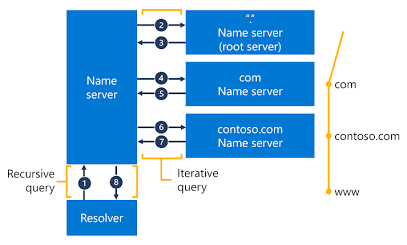
The Domain Name System (DNS) translates human-readable domain names into information that computers use to locate internet services. DNS records define how a domain directs website traffic, routes incoming emails, and verifies ownership for third-party platforms.
Among the most widely used DNS record types are A, CNAME, MX, and TXT records. Each serves a different purpose, and configuring them correctly helps maintain website accessibility, reliable email delivery, and domain security.
In this guide, you will learn what these DNS records are, how they work, their practical applications, and how to configure them correctly.
What Are DNS Records?
DNS records are configuration entries stored in a domain's DNS zone. They provide information that DNS resolvers use to identify the servers and services associated with a domain name.
For example, a website may use an A record to connect its domain to a server's IPv4 address, an MX record to identify its email servers, and TXT records to verify domain ownership or support email authentication.
Why Are DNS Records Important?
DNS records are essential for several aspects of website and domain management:
Website connectivity: Directs domain names to the appropriate hosting infrastructure.
Email delivery: Identifies the servers responsible for receiving domain email.
Domain verification: Helps confirm ownership when connecting third-party services.
Email security: Supports authentication technologies such as SPF, DKIM, and DMARC.
Subdomain management: Connects subdomains to websites, applications, and external platforms.
Understanding DNS records helps website owners, developers, IT professionals, and digital marketers troubleshoot common domain-related issues.
1. What Is an A Record in DNS?
An A record (Address Record) maps a domain name or hostname to an IPv4 address. It is commonly used to connect a website domain to the server hosting the website.
For example, if a hosting provider supplies the illustrative IPv4 address 192.0.2.10, an A record can direct example.com to that address.
Example of an A Record
| DNS field | Example |
|---|---|
| Record type | A |
| Host/Name | @ |
| Value | 192.0.2.10 |
| TTL | 3600 seconds |
The @ symbol commonly represents the root domain, although the exact notation depends on the DNS provider.
Common Uses of an A Record
Connecting a domain to a web hosting server.
Pointing a subdomain to a specific IPv4 address.
Configuring a domain using the IP address supplied by a hosting provider.
Managing DNS for websites hosted on dedicated or virtual servers.
A Record Configuration Best Practices
Verify the Server IP Address
Always use the correct IP address supplied by your hosting provider. An incorrect address may prevent visitors from accessing the intended website.
Review Existing DNS Entries
Before updating an A record, review the existing DNS configuration to avoid conflicts or unexpected website downtime.
2. What Is a CNAME Record in DNS?
A CNAME record (Canonical Name Record) creates an alias from one hostname to another hostname. Unlike an A record, which specifies an IPv4 address, a CNAME record specifies a canonical hostname.
For example, www.example.com can be configured as a CNAME pointing to example.com, provided the DNS setup supports that configuration.
Example of a CNAME Record
| DNS field | Example |
|---|---|
| Record type | CNAME |
| Host/Name | www |
| Value | example.com |
| TTL | 3600 seconds |
Common Uses of a CNAME Record
CNAME records are frequently used to:
Point a
wwwsubdomain to another hostname.Connect a domain or subdomain to a third-party website platform.
Configure services that provide a specific destination hostname.
Simplify DNS management when a destination hostname's IP address changes.
CNAME Record Limitations
CNAME Records and Other DNS Records
A standard CNAME generally cannot coexist with other record types at the same hostname. Check existing DNS entries before adding a CNAME record.
CNAME Records at the Root Domain
Tradi
- A Record
- Maps a domain name or hostname to an IPv4 address, helping connect a website to its server.










































































































































































































Leave A Comment