
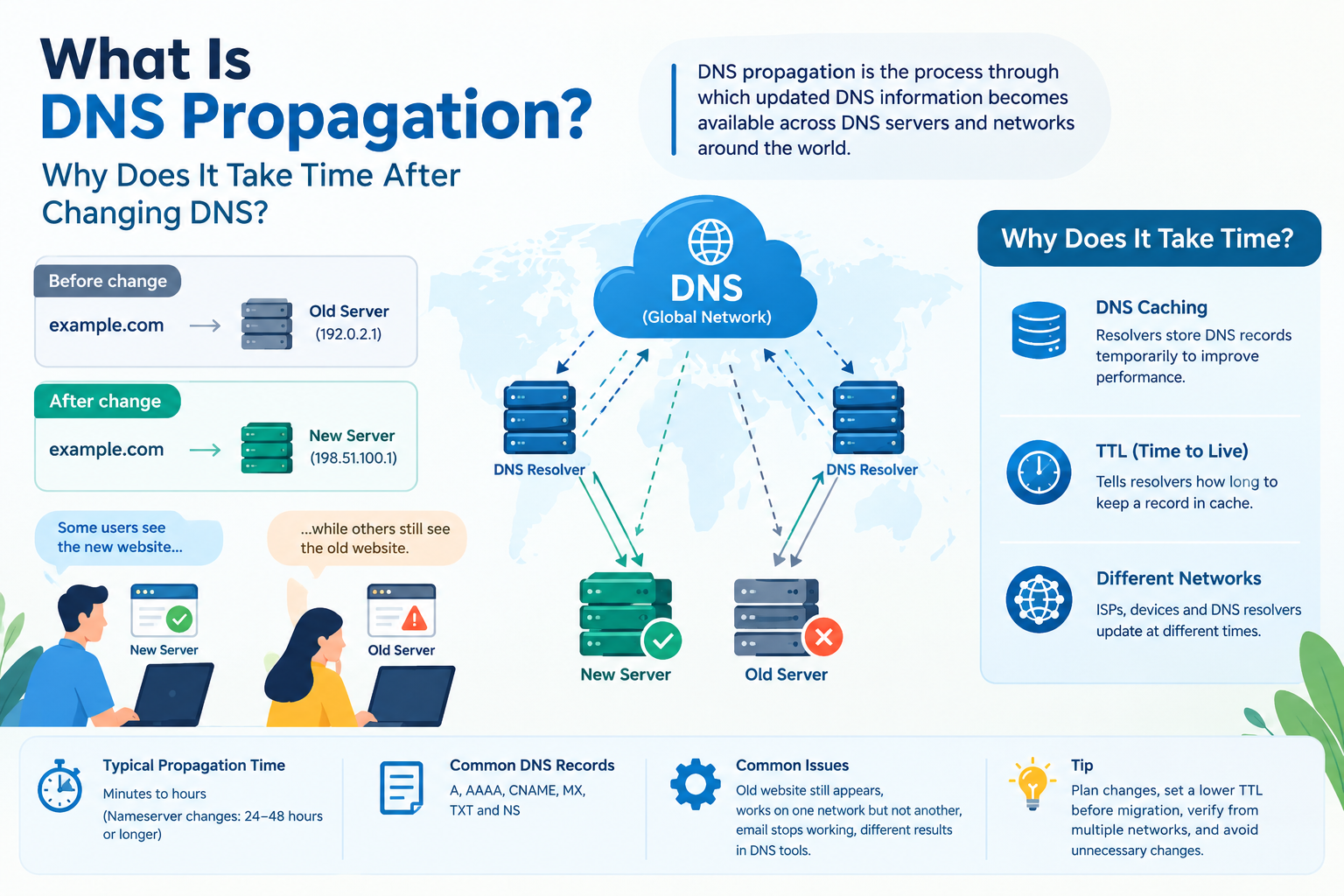
What Is DNS Propagation? Why Does It Take Time After Changing DNS?
Short answer: DNS propagation is the process through which updated DNS information becomes available across DNS servers and networks. When you change a DNS record, different users may temporarily see different results because DNS resolvers cache previous information based on the record’s TTL.
When you change your website’s DNS settings, you may expect the changes to appear immediately. However, it is common for a DNS change to take some time before it works consistently for everyone.
This waiting period is known as DNS propagation.
DNS propagation can be confusing, especially when a website works correctly on one device or network but still shows the old website on another. Understanding how DNS works and why propagation takes time can help you troubleshoot these issues more effectively.
In this guide, we’ll explain what DNS propagation is, why DNS changes take time, how long propagation usually takes, and what you can do if your DNS changes are not showing up.
Table of Contents
What Is DNS?
What Is DNS Propagation?
Why Does DNS Propagation Take Time?
How Long Does DNS Propagation Take?
What Happens During DNS Propagation?
Common DNS Changes That Require Propagation
Why Does My Website Work for Some People but Not Others?
How to Check DNS Propagation
How to Reduce DNS Propagation Issues
Common DNS Propagation Problems
Frequently Asked Questions
Conclusion
What Is DNS?
DNS (Domain Name System) is like the internet’s phonebook. It converts human-readable domain names, such as example.com, into IP addresses that computers and servers can understand.
For example:
Domain: example.com
IP Address: 192.0.2.1
When someone enters your domain name into a browser, the DNS system helps the browser find the correct server where your website is hosted.
Without DNS, users would have to remember numerical IP addresses instead of simple domain names.
What Is DNS Propagation?
DNS propagation is the process through which updated DNS information becomes available across DNS servers and networks around the world.
When you make a DNS change, such as pointing your domain to a new hosting server, the change does not necessarily reach every DNS resolver immediately.
Different internet service providers, networks, devices, and DNS resolvers may temporarily have different versions of your DNS information.
For example:
Before DNS change:
example.com → Old Server
After DNS change:
example.com → New Server
Some users may reach the new server while others may still be directed to the old server until their DNS information is updated.
Why Does DNS Propagation Take Time?
The main reason DNS changes take time is DNS caching.
DNS resolvers temporarily store DNS information so that they do not have to look up the same domain repeatedly.
This improves internet performance and reduces unnecessary DNS queries.
Every DNS record has a value called TTL (Time to Live). TTL tells DNS resolvers how long they can keep a DNS record in their cache before checking for updated information.
For example, if a DNS record has a TTL of 3600 seconds, it can be cached for approximately:
3600 seconds = 1 hour
After the cached information expires, the resolver can request the updated DNS record.
This is one of the main reasons DNS changes are not always visible immediately.
How Long Does DNS Propagation Take?
DNS propagation does not have one fixed duration.
In many cases, DNS changes can become visible within a few minutes or hours. However, depending on the DNS records, TTL settings, DNS providers, caching, and networks involved, it can sometimes take longer.
A practical expectation is:
| DNS Change | Typical Visibility |
|---|---|
| Simple DNS record update | Minutes to several hours |
| Nameserver change | Several hours to up to 24–48 hours |
| Major DNS changes | Can sometimes take longer |
The exact time depends on the DNS infrastructure involved.
It is important not to repeatedly change DNS records while waiting, because unnecessary changes can make troubleshooting more difficult.
What Happens During DNS Propagation?
Let's understand the process with a simple example.
Suppose your website is currently hosted on Server A.
Your DNS record points to:
example.com → Server A
You decide to move your website to Server B and update the DNS record.
The new record becomes:
example.com → Server B
However, some DNS resolvers may still have the old record stored in their cache.
As a result:
User A → DNS Resolver → Server A
while another user may get:
User B → DNS Resolver → Server B
Once the old cached DNS information expires, more users will start receiving the updated record.
Eventually, the new DNS information becomes widely available.
Common DNS Changes That Require Propagation
Several types of DNS changes may take time to become visible.
1. Changing an A Record
An A record connects a domain name to an IPv4 address.
Example:
example.com → 203.0.113.10
If you move your website to a different server, you may need to update the A record.
2. Changing a CNAME Record
A CNAME record points one domain or subdomain to another hostname.
For example:
www.example.com → example.hostingprovider.com
Changing this record may also require DNS caches to refresh.
3. Changing Nameservers
Nameserver changes are especially important when moving a domain between hosting or DNS providers.
For example:
Old nameservers → New nameservers
Because nameserver information is cached at different levels, these changes can take time to become visible globally.
4. Changing MX Records
MX records control where your domain's email is delivered.
If you change your email provider and update your MX records, DNS propagation can affect email delivery during the transition.
5. Changing TXT Records
TXT records are commonly used for:
Domain verification
Email authentication
SPF
DKIM
DMARC
Third-party service verification
These records may also take some time to update across DNS resolvers.
Why Does My Website Work for Some People but Not Others?
This is one of the most common DNS propagation questions.
If your website works correctly for you but another person still sees the old website, it does not necessarily mean that your DNS configuration is wrong.
Different users may be using different DNS resolvers.
For example:
Your network → Updated DNS information → New server
Another network → Cached DNS information → Old server
The difference can happen because their DNS resolver has not yet refreshed the previous DNS information.
This is why DNS propagation can sometimes appear inconsistent.
How to Check DNS Propagation
If you have recently changed DNS records, you can check whether the new information is visible from different locations.
You can use online DNS lookup and propagation-checking tools to compare DNS results from different locations.
You can check records such as:
A
AAAA
CNAME
MX
TXT
NS
When checking DNS, make sure you are looking at the correct record type and hostname.
For example, if you changed an A record for example.com, check the A record rather than only checking the nameservers.
How to Reduce DNS Propagation Issues
You cannot completely eliminate DNS propagation, but you can reduce potential problems by planning DNS changes carefully.
1. Check Your TTL Before Making Changes
A lower TTL before a planned migration can help DNS resolvers refresh records sooner.
However, changing TTL does not instantly remove information that has already been cached. Existing cached records may continue to be used until their previous TTL expires.
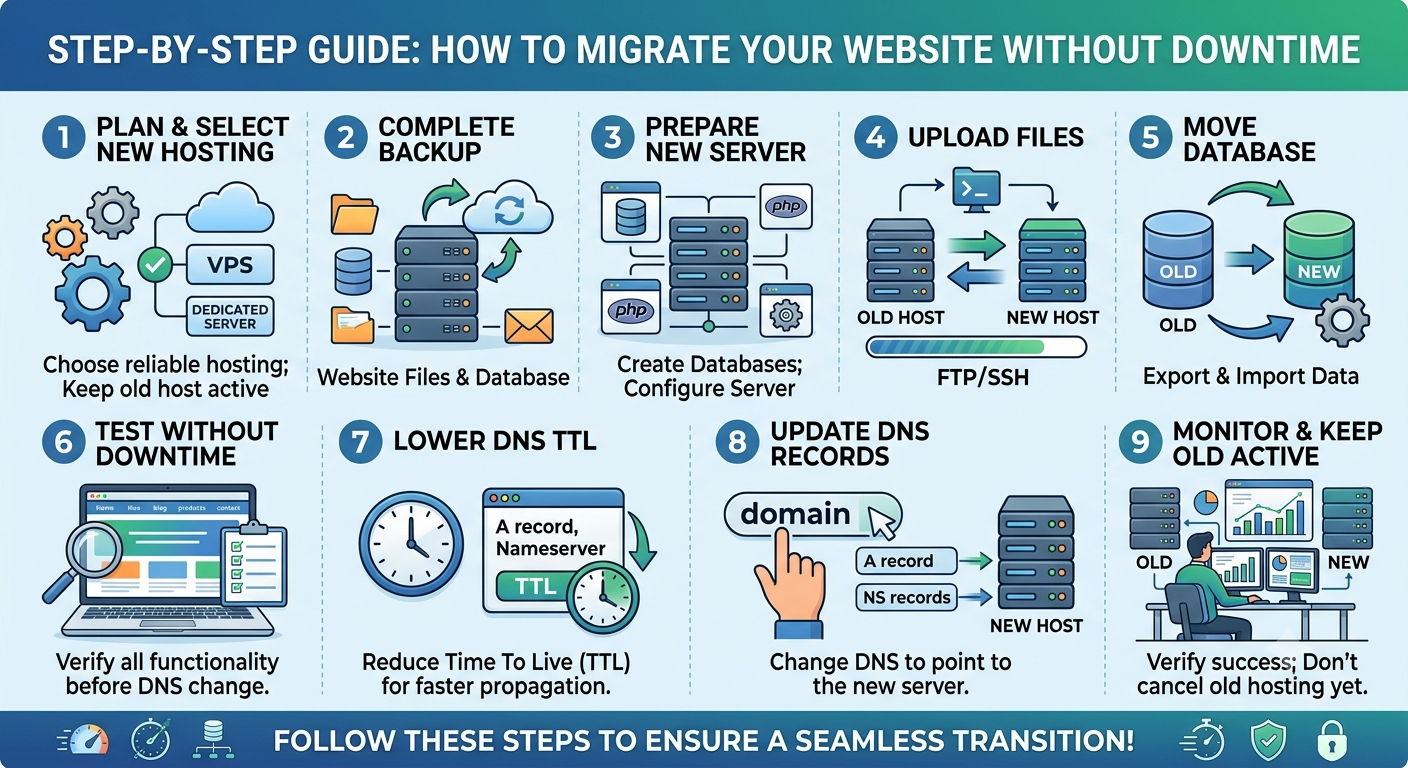
2. Plan Website Migrations
If you are moving your website to a new hosting provider, prepare the new server before changing DNS.
Make sure:
The website is working on the new server.
SSL is configured.
Databases are ready.
Email settings are checked.
DNS records are documented.
3. Avoid Unnecessary DNS Changes
Changing the same DNS record repeatedly can make troubleshooting harder.
Make the correct change and then allow sufficient time for DNS caches to refresh.
4. Check DNS From Multiple Networks
If possible, check your domain using different networks, such as:
Mobile data
Wi-Fi
Office network
Different DNS resolvers
This can help identify whether the issue is local or related to DNS caching.
Common DNS Propagation Problems
Old Website Still Appears
If visitors see your old website after changing hosting, their DNS resolver may still have the previous IP address cached.
Website Works on Mobile but Not Wi-Fi
This can happen when your mobile network and Wi-Fi connection use different DNS resolvers.
Email Stops Working After DNS Changes
Incorrect MX, SPF, DKIM, or other DNS records can affect email services.
Always verify your email-related DNS records when changing nameservers or hosting.
DNS Record Shows Different Values
Different DNS lookup tools may temporarily show different results because DNS information is cached across different resolvers.
DNS Propagation vs DNS Cache
These terms are closely related but are not exactly the same.
DNS caching is the process of storing DNS information temporarily.
DNS propagation describes the process by which updated DNS information becomes available across different DNS resolvers and networks.
Caching is one of the main reasons propagation takes time.
Frequently Asked Questions About DNS Propagation
How long does DNS propagation usually take?
DNS changes can become visible within minutes or hours, but some changes—particularly nameserver changes—may take up to 24–48 hours or sometimes longer depending on caching and DNS infrastructure.
Can I speed up DNS propagation?
You cannot force every DNS resolver on the internet to update immediately. However, lowering the TTL before a planned DNS change can help reduce the caching period for future lookups.
Does clearing my browser cache fix DNS propagation?
Not usually. DNS caching can occur outside your browser, including on your operating system, router, ISP, and recursive DNS resolver.
Why is my website working for me but not for someone else?
You and the other person may be using different DNS resolvers, and one resolver may still have the old DNS information cached.
Does changing nameservers take longer than changing an A record?
It can. Nameserver changes can involve multiple layers of DNS infrastructure and may take longer to become consistently visible.
Is DNS propagation a hosting problem?
Not necessarily. DNS propagation is primarily related to DNS caching and the way DNS information is distributed and refreshed. However, incorrect DNS records or hosting configuration can also cause website access problems.
Can DNS propagation cause website downtime?
Yes, it can contribute to temporary access differences during a migration or DNS change, particularly if users are being directed to different servers.
Conclusion
DNS propagation is a normal part of managing a website and domain. When you change DNS records, the new information does not instantly appear everywhere because DNS resolvers temporarily cache previous information based on TTL values.
Most DNS changes become visible within minutes or hours, while some changes—especially nameserver changes—can take longer.
If you are moving a website, changing hosting providers, setting up email, or updating DNS records, plan the change carefully and verify your DNS configuration from multiple networks.
Understanding DNS propagation, DNS caching, TTL, A records, CNAME records, MX records, and nameservers can make website migrations and DNS troubleshooting much easier.
Need reliable hosting or help managing your website and DNS configuration? Choose a hosting provider and technical support team that can help you configure your DNS correctly and keep your website accessible.
- DNS Propagation
- The process of updated DNS information becoming available across DNS resolvers and networks.
- Main Cause of Delay
- DNS caching, which temporarily stores previous DNS records. TTL (Time to Live): Determines how long a DNS record can remain cached before a resolver checks for updated information.
- Typical Propagation Time
- DNS changes may become visible within minutes or hours. Nameserver changes can take 24–48 hours or sometimes longer.
- Common DNS Records:
- A, AAAA, CNAME, MX, TXT, and NS.
- Website Migration
- DNS changes may temporarily direct different users to old or new hosting servers.

























































































































































































Leave A Comment